Getting started
The dashboard
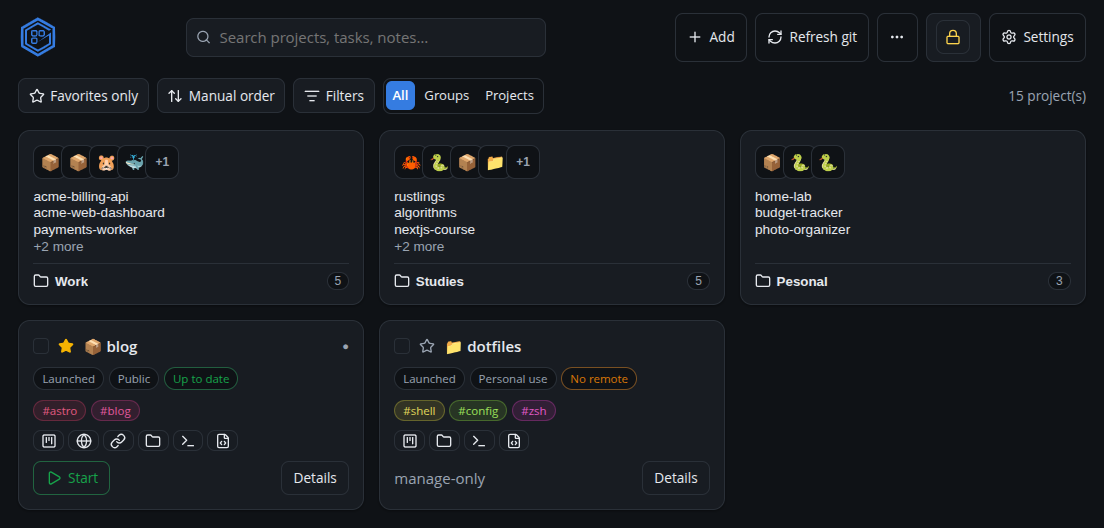
The dashboard is the home screen: every tracked project as a card, with search, filters and quick actions.
Top bar
- Search — global search across projects, tasks and notes. Focus it with / or Cmd/Ctrl+K.
- + Add — Discover projects, Clone by URL, Import from GitHub.
- Refresh git — fetch + refresh git status for every project.
- ⋯ (more) — Export / Import a manifest, and open Extensions.
- Settings — folders, security, GitHub, editor, notifications.
Filters
Filter the grid by stage, purpose and tag, and change the sort (favorites first, name, recent, stage). The count shows how many match.
Project cards
Each card shows:
- a favorite star and a multi-select checkbox;
- the type icon (tech stack) and name;
- a status dot — solid when Granspace started it, a hollow ring when it’s running but was started outside Granspace;
- badges for stage, purpose and git sync state, plus tag chips;
- quick links — board, localhost, repo, and (desktop) folder/terminal/editor;
- Start/Stop and Details.
Right-click a card (desktop) for a native menu (copy path, open folder/terminal/ editor).
Bulk actions
Tick several cards to reveal a bar to start / stop / refresh them together.
Port-conflict banner
If two running projects want the same host port, a banner lists the conflict. It is dismissible and stays dismissed until the conflicting ports actually change.